
Overview
Each Credit Hound Cloud subscription has a single Product Owner.
The Product Owner is responsible for:
Managing Billing/Subscription
Managing users
Controlling access to the system
Performing key administrative actions
Ownership can be transferred to another user when needed (e.g. staff changes)
Only the current Product Owner can transfer ownership
If you are unable to do this, see “If the Product Owner is Unavailable” below.
Important Notes
Only one Product Owner is allowed at any time
Only the current Product Owner can transfer ownership
The Product Owner cannot be removed or disabled
After transfer:
The new user becomes Product Owner
The previous Product Owner becomes an Administrator
How to Transfer Ownership
As the Product Owner, go to Settings > Users
Select the user you want to transfer ownership to. The Edit User screen appears
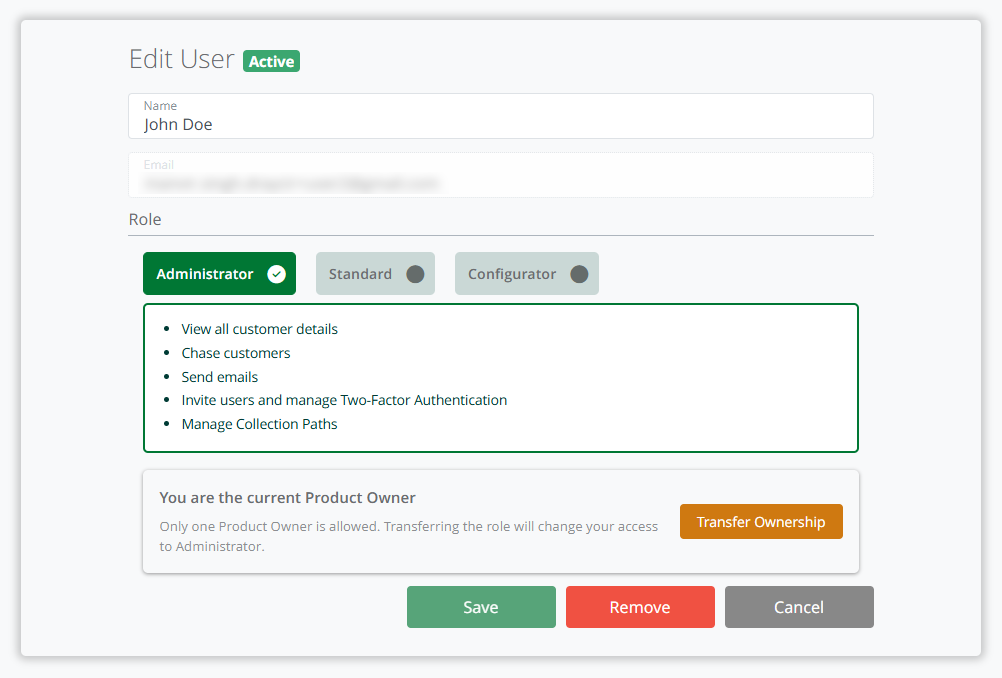
Edit User - Transfer Ownership
Click the Transfer Ownership button
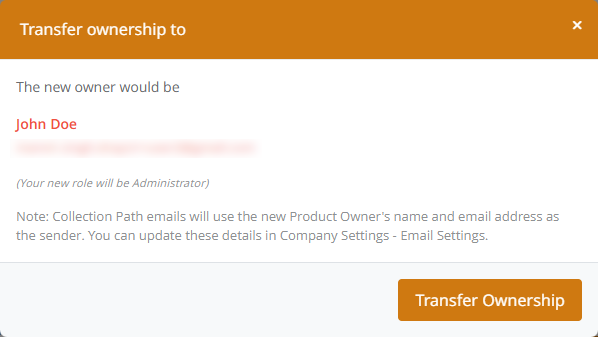
The dialog that appears will confirm who the new owner would be and that your new role will be Administrator
Confirm the action by clicking Transfer Ownership
Transfer Ownership from the Users List
You can also change a user’s role directly from the Users list. This provides a quicker way to update user roles without opening the full Edit User screen.
As the Product Owner, go to Settings > Users
Locate the new Product Owner user in the list
In the Role column, click the dropdown
Select the Product Owner role
The dialog that appears will confirm who the new owner would be and that your new role will be Administrator
Confirm the action
What Happens Next
The selected user is assigned the Product Owner role
Your role changes to Administrator
System access and permissions update immediately
On-Premise Connector Agent Synchronization
If you use an on-premise accounting system, then once you have transferred Product Ownership, ensure the synchronization user in the Agent configuration is updated. This ensures the synchronization Windows Service can continue to push data from the accounting system to Credit Hound Cloud.
Collection Path Email Settings Behaviour
If your Collection Path Email Settings in Company Settings > Email Settings are still using the current/default Product Owner’s details:
These will automatically update to the new Product Owner
If your Collection Path Email Settings in Company Settings > Email Settings have been customised instead of using the defaults:
They will remain unchanged and Collection Path emails will continue to be sent from this email address
You can update Email Settings at any time under:
Company Settings > Email Settings
Email Settings and Ownership Changes
If your Collection Path Email Settings have been customised, they will not be updated when ownership is transferred.
If the Product Owner is Unavailable
If the current Product Owner is unable to transfer ownership (for example, they have left the organisation or no longer have access),
Ownership cannot be transferred within the system
Please contact Draycir Support for assistance.